Workspaces stay focused on terminals.
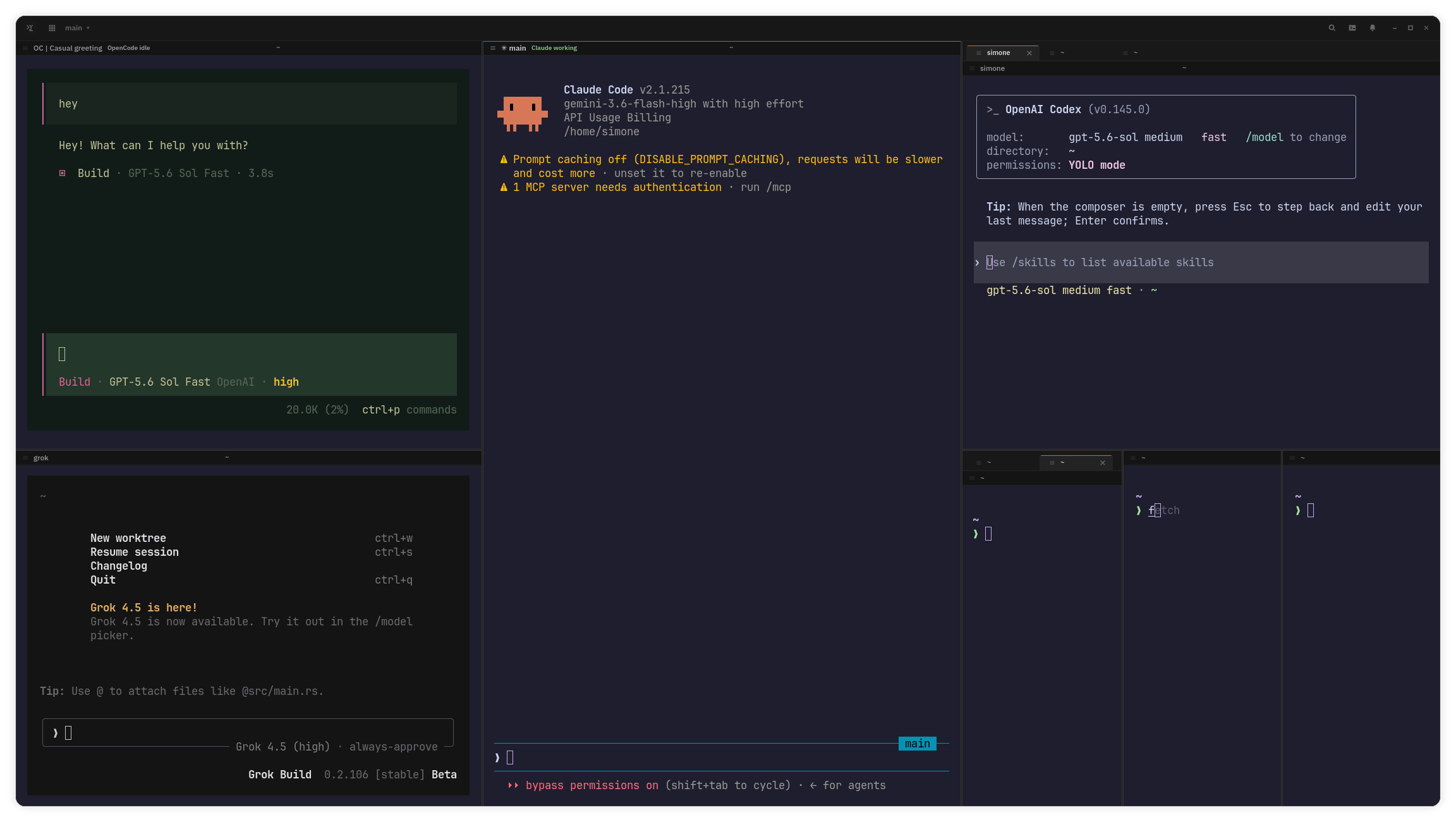
The GTK workbench keeps projects, tabs, split panes, unread state, and notifications visible without adding a second orchestration product beside the terminal.
❯ forktty tree
 Linux-nativeOpen sourcev0.2 alpha
Run Codex, Claude Code, Pi, Antigravity, OpenCode, Grok Build, and shell tools side by side in one native GTK/Ghostty workbench. Keep panes, worktrees, notifications, and resume-aware status visible.
AppImage and .deb builds for Linux x86_64 alpha. Verify SHA256SUMS before running.
Capabilities
ForkTTY keeps terminal panes, agent sessions, and git worktrees visible without moving project data off your machine.
The GTK workbench keeps projects, tabs, split panes, unread state, and notifications visible without adding a second orchestration product beside the terminal.
❯ forktty tree
Optional hooks for Codex, Claude Code, Antigravity, and OpenCode publish session ids, cwd, lifecycle, and last activity so the GTK HUD can focus or resume an agent.
❯ forktty agents
Each task gets an isolated git worktree workspace: create, attach, merge, remove, with dirty-state protection and setup/teardown hooks.
❯ forktty worktree-status
The owner-only JSON-RPC socket backs the CLI for workspace, pane, focus, terminal reads, notifications, worktrees, project actions, and thin agent lifecycle controls.
❯ forktty capabilities
GTK4/libadwaita in Rust around Ghostty's embedded terminal widget: split panes, tabs, retained scrollback, native selection and clipboard behavior, OSC links, visual bell, and desktop notifications.
Terminal contents, project data, and session files stay local. The default telemetry is limited to an anonymous daily usage ping and a once-a-day GitHub update check, both shown at first launch and controlled by a toggle. The Unix socket is owner-only, command execution is argv-based, and agent CLIs keep their own credentials.
Use cases
Start from the workspace you need: Codex, Claude Code, external MCP tools, git worktrees, Agent HUD, Ghostty panes, or PTY persistence.
Run Codex in a Linux-native ForkTTY workspace with Ghostty panes, git worktrees, notifications, optional hooks, and safe resume flows.
Run Claude Code in visible Ghostty panes with workspace navigation, git worktrees, notifications, optional hooks, and resume metadata.
Run MCP-enabled agent clients and external MCP servers as normal processes in ForkTTY terminal panes; ForkTTY itself exposes a small local socket API.
Use ForkTTY git worktree workspaces to isolate parallel coding agents, branches, setup hooks, merges, removes, and repository state.
ForkTTY's Agent HUD shows optional lifecycle metadata, current pane, freshness, resume readiness, and risky permission modes.
ForkTTY embeds Ghostty terminal widgets in a native GTK4/libadwaita workspace with tabs, splits, scrollback, links, clipboard, and notifications.
Optionally keep plain terminal processes alive across ForkTTY UI restarts with local dtach-backed sessions.
Run multiple coding agents visibly in ForkTTY tabs, split panes, and git worktree workspaces without a built-in team or workflow engine.
Compare ForkTTY's Linux-native GTK/Ghostty workspace approach with terminal multiplexers, editor terminals, and orchestration-focused agent tools.
Latest release
Portable build — recommended
Debian / Ubuntu
$ sha256sum -c SHA256SUMS --ignore-missing$ chmod +x forktty-*.AppImage$ ./forktty-*.AppImage$ git clone https://github.com/Lucenx9/forktty.git$ cd forktty$ cargo run -p forktty-ui-gtkEarly alpha: expect breaking changes between releases, and builds are unsigned — verify against SHA256SUMS. Linux x86_64 only. The AppImage is the primary portable download; the .deb is for Debian/Ubuntu. Packaged builds ship the GTK/Ghostty terminal runtime, while browser panes remain source-only behind the browser feature.
FAQ